
AI claims, resolved.
Reads the whole file, cites the clause behind every recommendation, and leaves the decision with your handlers.
Filmed on real claims, with anonymised information.Watch on YouTube ↗
Built for claims teams reviewing policy documents, referrals, and supporting evidence. Your team makes the final call.
Book a live demo ↗From a full inbox to an informed decision. Follow one claim through the film. Here is what happens behind the recommendation.
Claims arrive the way they really do
A note, a referral, a hundred-page policy. Drop them in, or connect Outlook, Gmail, Salesforce, or your own claims system and it starts on its own.
It reads all of it, in minutes
Rules, limits, and definitions across every document. When the documents disagree, it never silently picks. It flags the conflict.
An engine that bends to your business
Your rules go in the policy pack and get cited by number. Your lookup tools go in the tool registry, and every lookup lands as a dated, cited source.
It takes a position
Authorise, or refer with a lean, with every reason cited to the page. It never auto-declines.
Your team keeps teaching it
A handler’s correction becomes a rule once a senior approves it. The next case of the same kind cites it.
Proof, then autonomy
In shadow mode it is measured against your team’s real decisions. Only when agreement clears the bar you set can you switch on auto-approve.
AI claims management, defined plainly. Buyers use three terms for three different jobs. Here is how Claim It Quick maps onto each.
AI claims processing
Getting a claim from arrival to a structured, validated record: extraction from PDFs, emails and scans, checks against cover and tariffs, and a request for anything missing. This is where most claims automation stops. Claim It Quick does it in minutes and keeps going.
AI claims adjudication
Deciding what the policy says about this claim. The engine reads the wording, applies your rules, and takes a position: authorise, or refer with a lean. Every reason is cited to the page. Declines are never automated, so the decision that matters most stays with a person.
AI claims handling
The human work around the decision: review, correction, escalation and the audit trail. Handlers see the evidence assembled, correct the engine where it is wrong, and their corrections become rules. Straight-through processing is switched on only after shadow mode proves agreement with your team.
Want the longer version? Read AI claims processing explained: handling, adjudication, and where agents fit.
See the reasoning. Review the evidence. A recommendation is only useful if your team can check it, so the assessment and its sources sit together in the review.
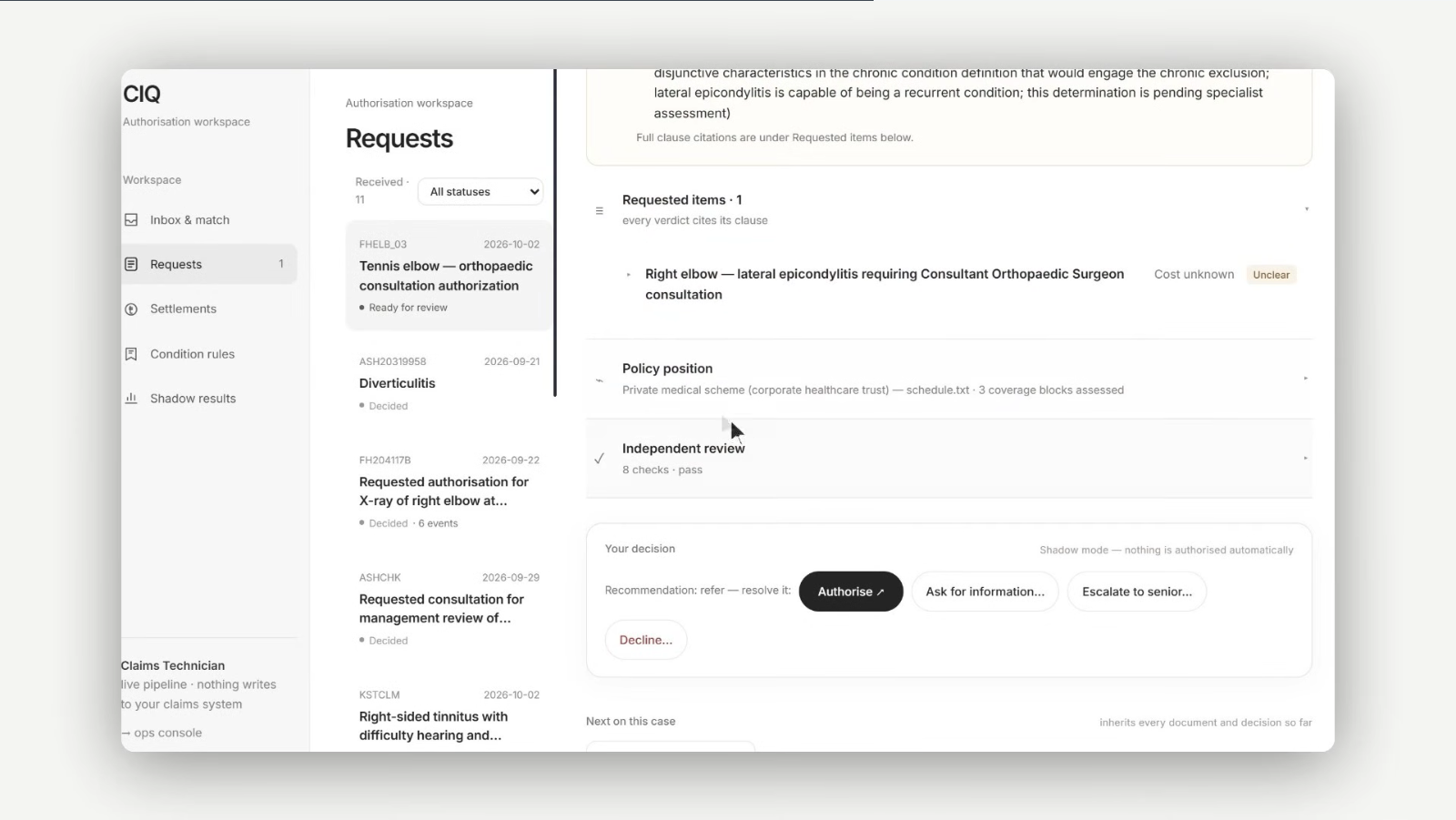
Move faster. Keep control. Human judgement at the centre. Evidence behind every recommendation.
Always a human
It never auto-declines. Declines, referrals, and fraud flags go to your team.
Cited to the clause
Every recommendation carries its reasons, each linked to the page it came from.
Your cloud
Runs on AWS, Azure, Databricks, or your own infrastructure.
No training on client data
Your claims data is not used to train models.
How it fits your claims operation. Start with your policy wording, your documents, and the decisions your team makes today.
Who is Claim It Quick for?
Claims handlers, claims operations leaders, and teams responsible for reviewing policy coverage and supporting evidence. It is used by insurers, MGAs, third-party administrators and healthcare payers who want faster claims processing without taking the handler out of the decision.
Which claim types can it handle?
The workflow is configured around your policy pack and business rules, so it is not limited to one line. Our healthcare claims case study shows it adjudicating medical claims for a UK trust. In a demo, we review your claim types and documents to establish fit and the configuration needed.
What is the difference between claims processing and claims adjudication?
Claims processing is the administrative path: receiving the claim, extracting the data, validating it against cover and tariffs, and moving it to the right queue. Adjudication is the judgement: deciding what the policy says about this claim and whether it should be paid. Claim It Quick automates processing fully and supports adjudication with a cited recommendation that a handler confirms.
What is straight-through processing in insurance claims?
Straight-through processing, or STP, is a claim settled with no human touch at any step. Claim It Quick supports STP only for approvals, only within thresholds you set, and only after shadow mode shows its recommendations agree with your team's decisions. Declines, referrals and fraud flags always go to a person.
How is agentic AI different from claims automation or RPA?
Rules engines and robotic process automation follow a fixed script and stop when something unexpected arrives, such as a missing document or two sources that disagree. An agentic system reads the documents, works out what is missing, requests it, flags conflicts, and explains its reasoning. The result is that exceptions get handled instead of queued.
Can AI decline an insurance claim in the UK?
Claim It Quick never auto-declines, by design. The Data (Use and Access) Act 2025 inserted Articles 22A to 22D into UK GDPR and allows solely automated decisions with significant effects only with safeguards: the claimant must be told, be able to make representations, obtain human intervention and contest the outcome. The FCA's Consumer Duty adds a duty to avoid foreseeable harm in claims handling. Keeping declines with a handler, and keeping the engine's reasons on file, satisfies both.
Can it work with our existing systems?
Documents can be uploaded directly, or intake can connect to Outlook, Gmail, Salesforce, or your claims system. The integration scope and any lookup tools are agreed around your workflow.
Does it make decisions without a handler?
It recommends an outcome with reasons linked to source documents. It never auto-declines. Declines, referrals, and fraud flags go to your team. Auto-approval is a separate step you can enable after shadow-mode evaluation meets your agreed threshold.
Where does our claims data run?
Deployment can use AWS, Azure, Databricks, or your own infrastructure. Your claims data is not used to train models. We discuss the deployment and data requirements for your organisation during scoping.
How would a pilot start?
We agree the claim types, policy pack, and evaluation criteria, then use shadow mode to compare recommendations with your team's decisions. Your team reviews disagreements before any decision to enable auto-approval.
Your claims, your rules. See it in action.
A live walkthrough with the engineers who built it. Tell us which claims you handle and we’ll show you how it would run in shadow mode.
01 Your claim types and document flow
02 Recommendations, citations, and review
03 A path to shadow mode in your business